Field reference
Protocols, signals, networking, equipment and troubleshooting references in one place, built for a phone in a mechanical room. Laminate-ready field cards, a Wireshark profile built for BAS traffic, and printable references from the books. Free, no signup, and it all works offline once you’ve opened it.
Quick lookup
Protocols
Networking
Signals and sensors
Drives, motors and mechanical
BAS Communication field kit
Four cards from BAS Communication: A Field Reference, laid out on US Letter to survive lamination. Print them, laminate them, put them in the truck.
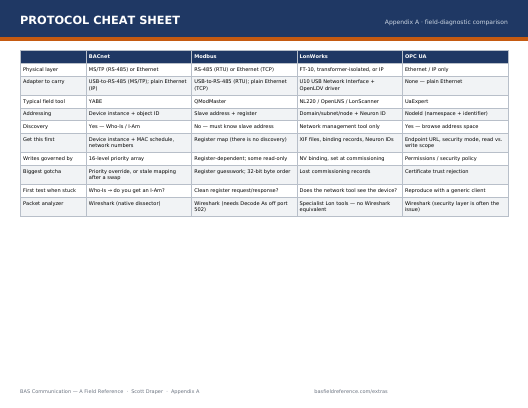 Appendix A · landscapeProtocol Cheat SheetBACnet, Modbus, LonWorks and OPC UA side by side — addressing, discovery, first things to check and the packet analyser for each.Download PDF 44 KB
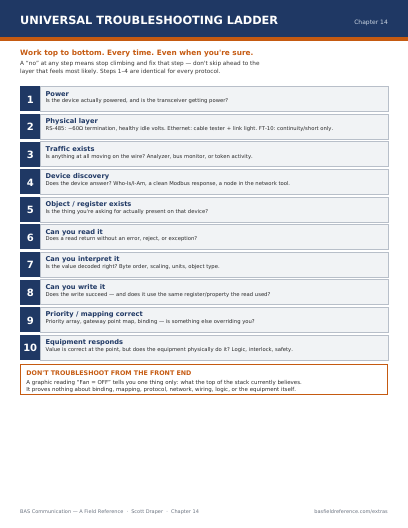 Chapter 14Universal Troubleshooting LadderTen steps from power to equipment response. Work to the bottom; a “no” at any rung stops the climb.Download PDF 44 KB
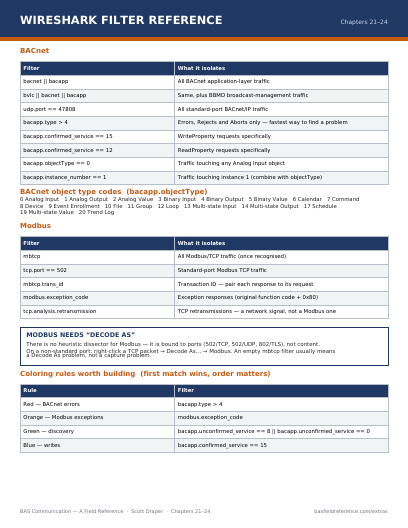 Chapters 21–24Wireshark Filter ReferenceEvery display filter from the book for BACnet and Modbus, the BACnet object type codes, and the colouring rules.Download PDF 45 KB
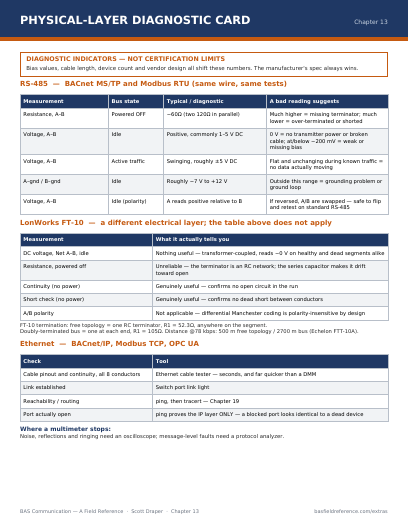 Chapter 13RS-485 and FT-10 Diagnostic CardMeter values for BACnet MS/TP, Modbus RTU and LonWorks FT-10 segments — what healthy looks like and what each reading suggests.Download PDF 45 KB
Download the whole kit (.zip, 172 KB) All four cards plus the Wireshark profile.
Wireshark profile for BAS work
The one people forget to install. It takes two minutes and turns a capture from a read-every-line exercise into a visual scan — BACnet errors and Modbus exceptions colour themselves red and orange before you’ve consciously looked for them.
- Six colouring rules for errors, exceptions, writes, discovery, BBMD traffic and retransmissions
- Three custom columns: BACnet APDU type, BACnet object instance and Modbus transaction ID
- Fourteen saved display filters from Chapters 21–24, grouped under “BAS:” in the filter bookmarks
Tested against Wireshark 3.x and 4.x. Your existing setup is untouched — a profile is a separate folder, not an overwrite.
Install in two minutes
- Unzip the download.
- In Wireshark: Help → About Wireshark → Folders.
- Double-click Personal configuration to open it.
- Open (or create) a folder called
profiles. - Create a folder inside it called
BAS-Fieldwork. - Copy
colorfilters,dfiltersandpreferencesinto it. - Restart Wireshark, click the profile name in the bottom-right corner and choose BAS-Fieldwork.
The fourteen saved filters
Display filters — paste into the filter bar at the top of the packet list.
| Filter | Expression | Copy |
|---|---|---|
| all BACnet | bacnet || bacapp | |
| BACnet + BBMD | bvlc || bacnet || bacapp | |
| BACnet/IP port | udp.port == 47808 | |
| BACnet errors only | bacapp.type > 4 | |
| BACnet WriteProperty | bacapp.confirmed_service == 15 | |
| BACnet ReadProperty | bacapp.confirmed_service == 12 | |
| BACnet discovery only | udp.port == 47808 and not bacapp.confirmed_service | |
| BACnet Analog Inputs | bacapp.objectType == 0 | |
| all Modbus/TCP | mbtcp | |
| Modbus standard port | tcp.port == 502 | |
| Modbus exceptions | modbus.exception_code | |
| TCP retransmissions | tcp.analysis.retransmission | |
| OPC UA | opcua | |
| ARP (find IP conflicts) | arp |
Colouring rules
Applied top to bottom; the first match wins, so order matters.
| Colour | What it flags | Rule |
|---|---|---|
| Red | BACnet Error / Reject / Abort | bacapp.type > 4 |
| Orange | Modbus exception | modbus.exception_code |
| Blue | BACnet WriteProperty | bacapp.confirmed_service == 15 |
| Green | BACnet discovery (Who-Is / I-Am) | bacapp.unconfirmed_service == 8 || bacapp.unconfirmed_service == 0 |
| Amber | BBMD / forwarded broadcast | bvlc.function >= 4 && bvlc.function <= 9 |
| Purple | TCP retransmission | tcp.analysis.retransmission |
Wireshark can’t see traffic between two other devices on a switched network. You need a SPAN or mirror port configured by IT — have that conversation before you’re standing in the mechanical room.
BAS Field Fundamentals field cards
Open a card, then use Print — or your browser’s “Save as PDF” to keep it offline.
Practise with the cards in hand
The matrix and the free checks are exactly what the twenty cases in the diagnostic simulator reward.
New extras by email
Field cards, tools and articles, sent when there’s something new.